
The ONMO+ Pro Controller supports up to 4 devices simultaneously — one per wireless mode. Switching between them takes just 2 seconds.
Which devices are supported?
The Pro Controller connects across all major platforms:
Bluetooth: Android, iOS, macOS, Windows PC
2.4 GHz USB dongle: TV, Windows PC
Wired (USB-C): Windows PC only
How does device memory work?
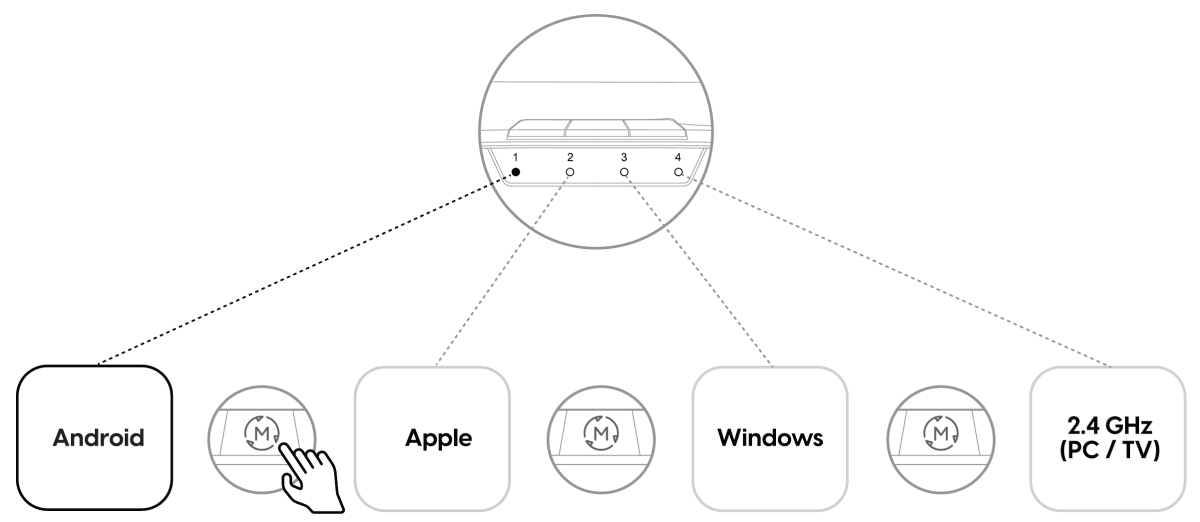
Each wireless mode independently stores one paired device. This means the controller can remember up to 4 devices at once — one per mode:
LED 1 — one Android device
LED 2 — one Apple device (iOS / macOS)
LED 3 — one Windows PC (Bluetooth)
LED 4 — one 2.4 GHz dongle connection (TV / PC)
How do I switch to a different device?
To switch modes, hold the M (Mode) button for 2 seconds. Repeat until the LED matching your target device lights up:

Once you're in the correct mode, the controller will automatically reconnect to the last paired device in that mode — no re-pairing needed.
First time connecting to a new device in a mode? After switching to the correct mode, hold the Pair button for 3 seconds until the LED flashes rapidly, then select the controller from your device's Bluetooth settings. The LED will turn solid and the controller will vibrate once to confirm the connection.